Workshop
Kometa Workshop
Kometa config is difficult. I don't even python like that, but at least the walkthrough guide was simple enough and anything weird I needed to troubleshoot, I could ask AI for help.
Once I was familiar with how it worked, I understood more of how the relationship is between Kometa and Plex. Kometa does not need local library access like Sonarr/Radarr - it gets it's library feed through your Plex API key.
It has a lot of functions but the main ones we are looking for are
- Collections - Meaning a group of movies (Seasonal Movies, Top IMDB Movies, Trending MyAnimeList, etc)
- Overlays - A tattoo on top of your cover art (HDR, Atmos, Dual-Audio, Netflix, Studio Ghibli, etc)
After some testing and trial I was able to get the desired output below:
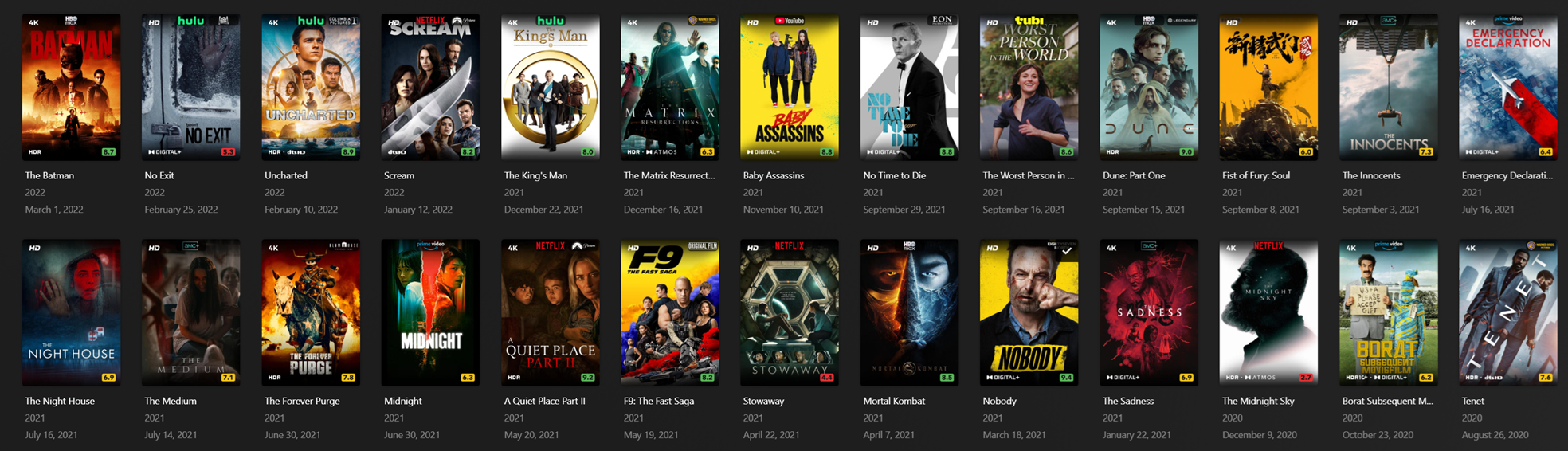
Then came the next issue - it took too long. Kometa has to scan for the latest collections, and then your libraries and apply to all libraries which can take a couple of hours depending on how large.
There are then two approaches:
- Do a massive config.yml file (collections+overlays) maybe once a week and schedule it
- Split them? But how
And I also had a fundamental problem:
I had a Movies library and a Marvel Movies library. Collections like IMDB Top 250 would be in both libraries and only show respective to whatever library you are viewing; it's a silly problem.
I ended up creating an All Movies library, keeping the other two as is - but with this new one I combined all of the movie directories (Marvel Movies, Movies, Anime Movies, Cartoon Movies) into one so that the collections actually are meaningful.
Unfortunately, once you apply overlays it's not quite as easy to remove them. You would have to do a reset_overlay thing from the config, but even then, the kometa poster will remain eating space on the drive until you run ImageMaid.
Anyways, I got tired of having to manually open notepad and command prompt every time I wanted to test new poster layouts.
My first shortcut was creating a .bat file
and what it did was just run the python kometa.py -r without me needing to type and enter on cmd.
Then I saw that you customize your .bat to reference a different config.yml than the default by adding a --config argument.
So I started working on this Kometa Config Builder.
It keeps default settings to make it work, but lays out the fields in a usable manner for the normal user.
It allows you to
- save your progress as
.html - export as
config.ymlorcustom-config.yml - and export
.bat(referencing.yml).
Once you have your collections of .yml and .bat, save them into the kometa\config folder.
Run the .bat manually by double clicking to validate your config build works.
Open up Task Schedular and set the .bat to run at whatever time you want to refresh your collections or overlays.
Ok I'm done.
Plex Pass gets jacked in July! GL